Understand the CCNA exam domains, prepare a safe practice environment, and perform the first Cisco IOS configuration and verification workflow.
Learning objectives
Explain how the six CCNA v1.1 domains are weighted.
Why Networks Matter and What You Will Learn
Build a small Packet Tracer topology and identify device roles.
Move safely among user EXEC, privileged EXEC, and global configuration modes.
Save, verify, and document a basic Cisco IOS configuration.
How to use this course
Work through lessons in order, reproduce every command, and predict the output before pressing Enter. Each lab follows the same operational loop: inspect the topology, establish a baseline, make one controlled change, verify the data plane, and save evidence. Reading creates familiarity; typing and troubleshooting create skill.
Exam blueprint
CCNA 200-301 v1.1 covers Network Fundamentals (20%), Network Access (20%), IP Connectivity (25%), IP Services (10%), Security Fundamentals (15%), and Automation and Programmability (10%). The percentages are planning weights, not a guarantee about an individual exam form. Build strength across every domain and spend extra practice time on routing, switching, subnetting, and verification.
Cisco IOS modes
The prompt shows the current mode. A greater-than prompt is user EXEC, a hash prompt is privileged EXEC, and text in parentheses identifies a configuration sub mode. Use enable to reach privileged EXEC, configure terminal for global configuration, exit to move up one level, end to return to privileged EXEC, and disable to return to user EXEC.
Configuration discipline
Before a change, capture show running-config, show ip interface brief, and the relevant protocol state. After the change, verify the intended behavior and unexpected side effects. Copy the running configuration to startup configuration only after verification. This habit prevents untested changes from surviving a reload.
Now let's start from Why do we need a Network?
A modern network connects people, devices, applications, data centers, and cloud services.
Start with one simple question
How
does a message leave your laptop, cross switches and routers, pass through
security controls, reach an application, and return successfully? CCNA
teaches you how to understand that entire journey.
6 Core Areas
Networking foundations
Hands-on
Configuration and verification
Real-world
Troubleshooting mindset
Why Do We Need Networks?
A network is the communication system that allows devices and users to share information and reach services. Without networking, computers would operate as isolated systems. With networking, a user can access applications, files, printers, voice services, cloud platforms, and the Internet from a single connected device.
Communicate
Email,
chat, voice, video, and collaboration tools.
Share Resources
Files,
printers, databases, storage, and applications.
Reach the Internet
Controlled
access to websites, SaaS, and public services.
Stay Secure
Firewalls,
segmentation, access control, VPNs, and encryption.
Work Remotely
Secure
access to business systems from anywhere.
Connect to Cloud
AWS,
Azure, Google Cloud, Microsoft 365, and more.
See the Picture: A Basic Enterprise Network
Most enterprise networks follow a layered path. Users connect to the access layer, traffic is aggregated by the core or distribution layer, and a firewall controls access to the Internet and data-center services.
Users → Access → Core/Distribution → Security → Internet / Data Center
Think like a network engineer
When
a user says “the application is not working,” do not jump immediately to the
application. Follow the path: physical link → switching → IP addressing →
routing → security → destination.
What Happens When You Open a website?
Opening a website may look instant, but many networking functions happen in sequence. Understanding this flow is one of the best ways to understand why CCNA topics matter.
Laptop → Access Switch → Default Gateway → Firewall → Internet / ISP → Web Server
1
DNS finds the
destination — The website name is translated into an IP address.
2
Ethernet moves
traffic locally — Frames travel through the local LAN using MAC
addresses.
3
Routing moves
packets between networks — Routers use destination IP addresses and
routing tables.
4
Security
policies are applied — Firewalls and ACLs decide what traffic is
permitted.
5
The server
responds — Return traffic follows a valid network path back to the user.
What Is CCNA?
Cisco Certified Network Associate (CCNA) develops the foundation needed to understand, configure, verify, secure, and troubleshoot modern IP networks. It is not only about memorizing commands—the goal is to understand why the network behaves the way it does.
CCNA mindset
Learn
the concept → understand the packet flow → configure the feature → verify the
result → troubleshoot failures.
What You Will Learn
1. Network Fundamentals
• OSI and TCP/IP models
• Ethernet, cabling, interfaces, and network devices
• IPv4 and IPv6 fundamentals
2. Network Access
• VLANs and trunking • Inter-VLAN communication • EtherChannel, STP, and wireless fundamentals
3. IP Connectivity
• Routing tables and path selection
• Static/default routing
• OSPF and first-hop redundancy concepts
4. IP Services
• DHCP, DNS, NAT, NTP
• SNMP and Syslog
• QoS concepts
5. Security Fundamentals
•ACLs and device hardening
• Port security and secure management
• AAA, VPN, and IPsec concepts
6. Automation & Programmability
• APIs and JSON
• Controller-based networking
• SDN and configuration automation concepts
How Networking Works Layer by Layer
Application
User-facing
services such as HTTP, DNS, SSH, and email.
Transport
End-to-end
communication using TCP and UDP.
Network
Packet
forwarding using IP addresses and routing.
Data Link
Local
frame forwarding using MAC addresses.
Physical
Bits
transmitted across copper, fiber, or wireless.
The Network Engineer’s Role
A network engineer is responsible for keeping the communication path available, secure, scalable, and understandable. CCNA builds the foundation for these responsibilities.
• Design and deploy LAN, WAN, wireless, and Internet connectivity.
• Configure routers, switches, and network services.
• Manage addressing, VLANs, routing, and security policies.
• Monitor availability, performance, and interface health.
• Troubleshoot connectivity from source to destination.
• Connect branches, data centers, remote users, and cloud environments.
• Use automation to improve consistency and reduce repetitive work.
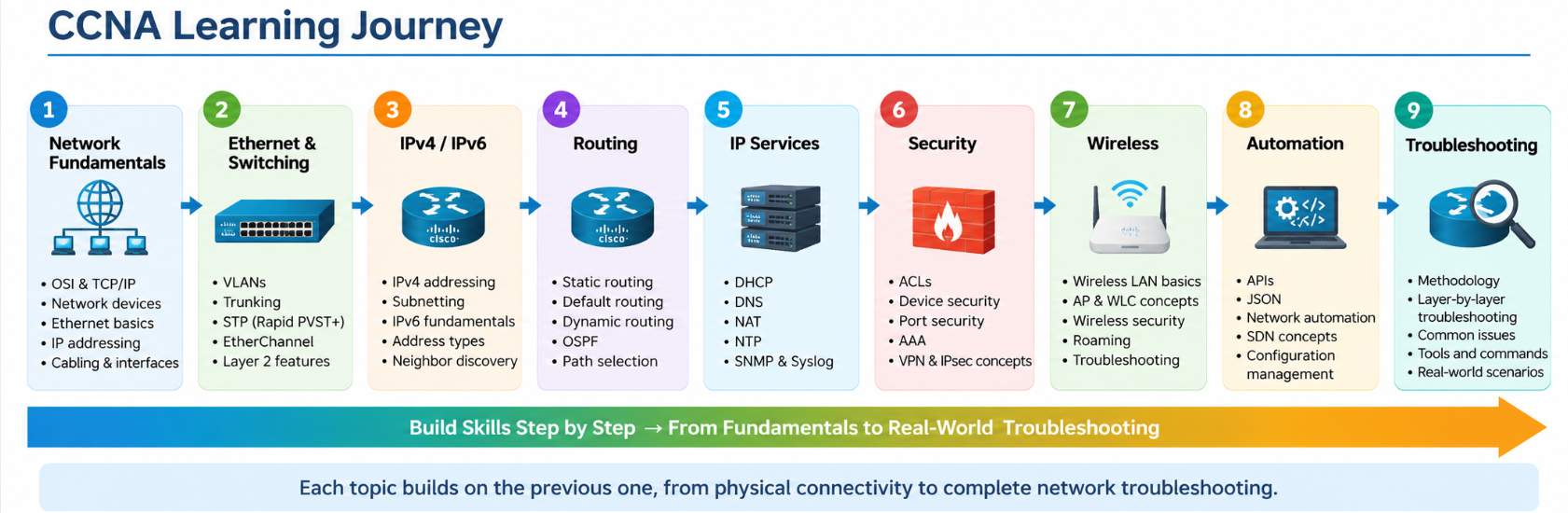
CCNA Learning Journey
Build the foundation first, then progress toward complete network troubleshooting.
Your goal is not just to pass an exam
By
the end of the course, you should be able to look at a network diagram,
understand how traffic is expected to flow, identify where a failure may
exist, and use the correct commands to verify it.
A Simple Troubleshooting Habit to Learn from Day One
If any part of this path fails, communication may fail. This end-to-end thinking will be used throughout the course.
Course Goal
By completing this CCNA course, you should understand how modern IP networks operate and be able to perform basic configuration, verification, and troubleshooting of routers, switches, network services, wireless connectivity, and security features.
The first question we will answer is: “How do two devices communicate with each other?”
WELCOME TO YOUR CCNA LEARNING JOURNEY
🔔 Notifications
PRIVACY
Your privacy choices
We use essential cookies for security and core features. With your permission, we also use analytics and advertising technologies to measure and improve Network Guide Academy.