
Overview
Virtualization allows multiple logical systems, applications, or network functions to operate on shared physical infrastructure. It improves resource utilization, scalability, flexibility, availability, and operational efficiency by reducing dependence on dedicated hardware.
In enterprise and data-center environments, virtualization is commonly applied to both servers and network devices.
Learning Objectives
- Explain why enterprises virtualize servers and network functions, and identify the core abstraction layers.
- Differentiate Type 1 (bare-metal) and Type 2 (hosted) hypervisors by architecture, performance, isolation, and use case.
- Identify VM components such as vCPU, vRAM, vDisk, vNIC, guest OS, and virtual hardware.
- Explain how a virtual switch forwards traffic between VMs and connects virtual networks to physical Ethernet.
- Trace same-host, cross-host, inter-VLAN, and north–south packet flows.
- Compare physical and virtual network components and recognize where Layer 2 and Layer 3 functions move into software.
- Interpret an enterprise server-virtualization topology with redundant hosts, uplinks, switching, management, and storage networks.
- Troubleshoot common virtualization connectivity problems in a dependency-based sequence.
Recommended Prerequisites
CCNA-level Ethernet, VLAN, trunking, IP addressing, ARP/ND, default gateway, and routing fundamentals.
Basic server concepts: CPU, RAM, storage, NIC, operating system, application.
Familiarity with EtherChannel/LACP and basic data-center switching is helpful but not required.
|
Training approach: Treat virtualization as a networking topic, not just a server topic. Every virtual interface, virtual switch, VLAN, uplink, and gateway still obeys familiar Layer 2 and Layer 3 rules. |
1. Virtualization Fundamentals
Virtualization is the abstraction of computing resources from the physical hardware that provides them. Instead of binding one operating system and one application stack to one physical server, a virtualization layer allows multiple logical systems to share the same CPU, memory, storage, and network interfaces while remaining isolated from one another.
Core Virtualization Principles
Virtualization enables organizations to run multiple independent virtual environments on shared physical infrastructure. It improves hardware utilization, flexibility, scalability, and operational efficiency.
Virtualization enables organizations to run multiple independent virtual environments on shared physical infrastructure. It improves hardware utilization, flexibility, scalability, and operational efficiency.
1. Abstraction
Virtualization separates software from the underlying physical hardware. Each virtual machine (VM) operates with its own virtual CPU, memory, storage, and network interfaces without requiring direct control of the physical components.
Example: A Windows Server VM operates as an independent server, even though it shares a physical host with other VMs.
Virtualization separates software from the underlying physical hardware. Each virtual machine (VM) operates with its own virtual CPU, memory, storage, and network interfaces without requiring direct control of the physical components.
Example: A Windows Server VM operates as an independent server, even though it shares a physical host with other VMs.
2. Resource Pooling
Physical computing resources, including CPU, RAM, storage, and network capacity, are shared and allocated among multiple virtual machines based on their requirements.
Example: A physical server with 128 GB RAM can host several VMs, each assigned a portion of the available memory.
Physical computing resources, including CPU, RAM, storage, and network capacity, are shared and allocated among multiple virtual machines based on their requirements.
Example: A physical server with 128 GB RAM can host several VMs, each assigned a portion of the available memory.
3. Isolation
Each virtual machine operates in a logically separated environment. Problems within one VM generally do not directly affect other VMs running on the same host.
Example: If one VM crashes, other VMs can continue operating normally, provided the underlying host remains healthy.
Each virtual machine operates in a logically separated environment. Problems within one VM generally do not directly affect other VMs running on the same host.
Example: If one VM crashes, other VMs can continue operating normally, provided the underlying host remains healthy.
4. Server Consolidation
Virtualization allows multiple workloads to run on fewer physical servers, reducing hardware requirements, power consumption, and operational costs.
Example: Five separate application servers can be consolidated into five VMs running on a single sufficiently powerful physical host.
Virtualization allows multiple workloads to run on fewer physical servers, reducing hardware requirements, power consumption, and operational costs.
Example: Five separate application servers can be consolidated into five VMs running on a single sufficiently powerful physical host.
5. Portability
Virtual machines can be moved, cloned, backed up, or restored across compatible virtualization infrastructure.
Example: VMware vMotion can migrate a running VM between compatible hosts without requiring the guest operating system to be shut down, subject to migration requirements.
Virtual machines can be moved, cloned, backed up, or restored across compatible virtualization infrastructure.
Example: VMware vMotion can migrate a running VM between compatible hosts without requiring the guest operating system to be shut down, subject to migration requirements.
6. Automation
Virtualization platforms support automated provisioning, configuration, monitoring, and lifecycle management of virtual machines.
Example: Administrators can use VMware vCenter, PowerShell, or automation tools to deploy and manage multiple VMs without configuring every server manually.
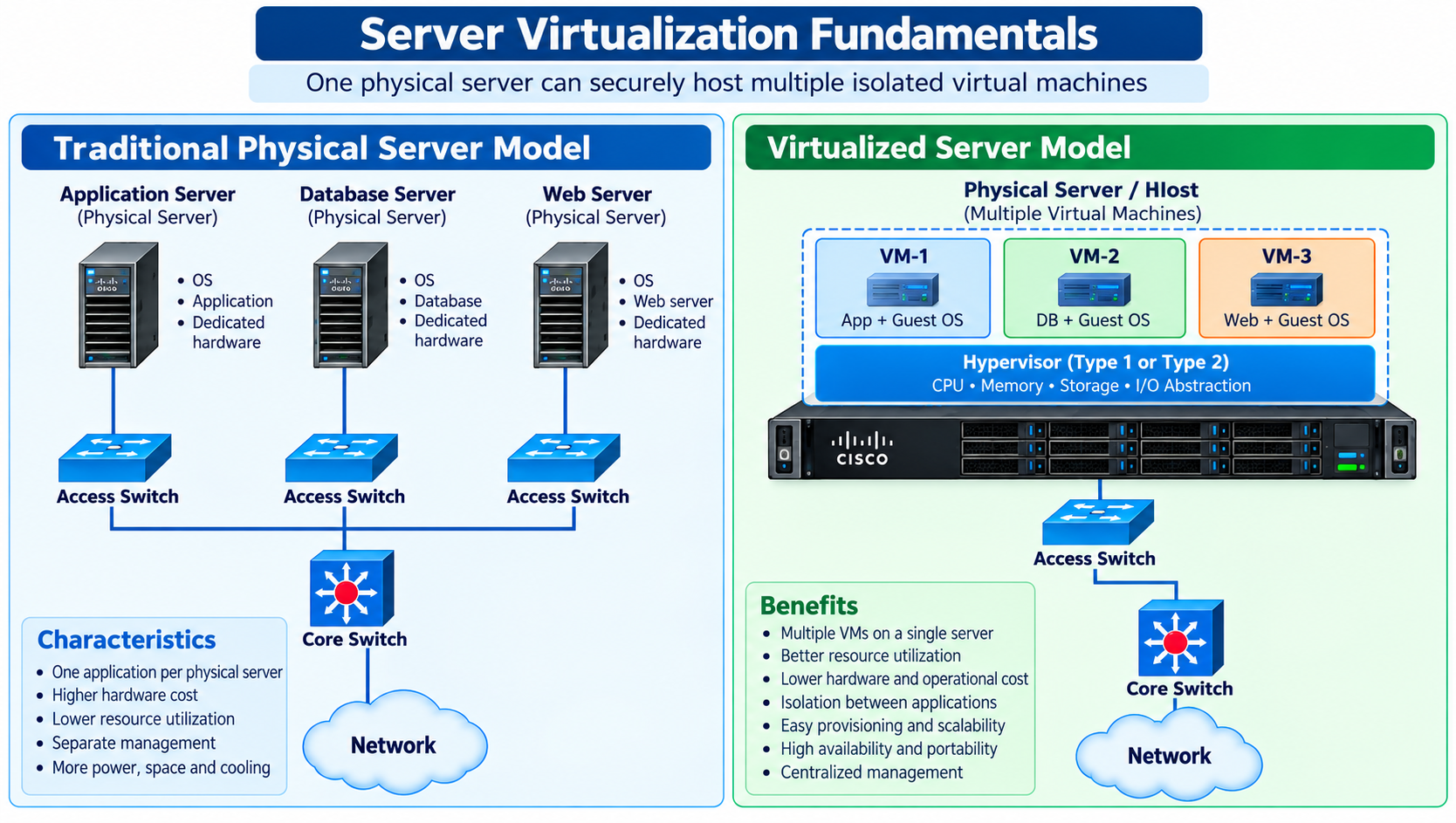
Figure
1: Physical-server consolidation through a hypervisor
Why Enterprises Use
Virtualization
- Reduce the number of physical servers required for
many workloads.
- Provision servers faster using templates and
automation.
- Separate workloads without purchasing dedicated
hardware for every application.
- Support high availability, live migration, backup,
disaster recovery, and capacity management.
- Create repeatable lab and test environments without
changing production hardware.
Virtualization platforms support automated provisioning, configuration, monitoring, and lifecycle management of virtual machines.
Example: Administrators can use VMware vCenter, PowerShell, or automation tools to deploy and manage multiple VMs without configuring every server manually.
Figure 1: Physical-server consolidation through a hypervisor
Why Enterprises Use Virtualization
- Reduce the number of physical servers required for many workloads.
- Provision servers faster using templates and automation.
- Separate workloads without purchasing dedicated hardware for every application.
- Support high availability, live migration, backup, disaster recovery, and capacity management.
- Create repeatable lab and test environments without changing production hardware.
|
Important: Virtualization does not remove the physical network. It adds a software networking layer between the guest VM and the physical Ethernet network. |
2. Hypervisors
A hypervisor, also called a virtual machine monitor (VMM), is the software layer that creates and manages virtual machines. It allocates physical resources to VMs, schedules CPU execution, maps guest memory, exposes virtual devices, and enforces isolation between workloads.
Main Hypervisor Responsibilities
- Create, start, stop, suspend, clone, and delete virtual machines.
- Schedule vCPUs on physical CPU cores and manage memory allocation.
- Present virtual disks, virtual NICs, controllers, and other virtual hardware to the guest OS.
- Provide virtual switching or connect VMs to a separate virtual-switching subsystem.
- Enforce isolation so one VM cannot normally access another VM’s memory or storage directly.
- Expose management interfaces and APIs for provisioning, monitoring, migration, and automation.
Figure 2: Type 1 and Type 2 hypervisor architecture comparison
3. Type 1 Hypervisor — Bare Metal
A Type 1 hypervisor runs directly on the physical server hardware. There is no general-purpose desktop operating system between the hypervisor and the hardware. This design is widely used for production virtualization because it provides direct control of CPU, memory, storage, and network resources and typically offers strong performance, isolation, and centralized lifecycle management.
|
Characteristic |
Type 1 Hypervisor |
|
Placement |
Runs directly on physical server hardware. |
|
Typical environment |
Enterprise data center, private cloud, production virtualization. |
|
Performance |
Low virtualization overhead and direct hardware control. |
|
Availability |
Commonly deployed in clusters with redundant networking and storage. |
|
Management |
Often integrated with centralized orchestration/management platforms. |
|
Examples |
VMware ESXi, Microsoft Hyper-V, and KVM-based virtualization platforms. |
From a network engineer’s perspective, a Type 1 host behaves like a small software-defined access layer: multiple VM vNICs connect to one or more vSwitches, and those vSwitches use physical NICs as uplinks to the data-center switching fabric.
4. Type 2 Hypervisor — Hosted
A Type 2 hypervisor runs as an application on top of a conventional host operating system. The host OS owns the physical hardware drivers, while the hosted hypervisor requests CPU, memory, storage, and network resources through that operating system. This model is well suited to labs, development, training, software testing, and endpoint-based virtualization.
5. Virtual Machines
A virtual machine is a software-defined computer. To the guest operating system, the VM appears to have its own CPU, memory,…