
Understand the CCNA exam domains, prepare a safe practice environment, and perform the first Cisco IOS configuration and verification workflow.
Learning objectives
- Explain how the six CCNA v1.1 domains are weighted.
- Build a small Packet Tracer topology and identify device roles.
- Move safely among user EXEC, privileged EXEC, and global configuration modes.
- Save, verify, and document a basic Cisco IOS configuration.
How to use this course
Work through lessons in order, reproduce every command, and predict the output before pressing Enter. Each lab follows the same operational loop: inspect the topology, establish a baseline, make one controlled change, verify the data plane, and save evidence. Reading creates familiarity; typing and troubleshooting create skill.
Exam blueprint
CCNA 200-301 v1.1 covers Network Fundamentals (20%), Network Access (20%), IP Connectivity (25%), IP Services (10%), Security Fundamentals (15%), and Automation and Programmability (10%). The percentages are planning weights, not a guarantee about an individual exam form. Build strength across every domain and spend extra practice time on routing, switching, subnetting, and verification.
Cisco IOS modes
The prompt shows the current mode. A greater-than prompt is user EXEC, a hash prompt is privileged EXEC, and text in parentheses identifies a configuration submode. Use enable to reach privileged EXEC, configure terminal for global configuration, exit to move up one level, end to return to privileged EXEC, and disable to return to user EXEC.
Configuration discipline
Before a change, capture show running-config, show ip interface brief, and the relevant protocol state. After the change, verify the intended behavior and unexpected side effects. Copy the running configuration to startup configuration only after verification. This habit prevents untested changes from surviving a reload.
Command reference
enable
show clock
show version
show inventory
show ip interface brief
configure terminal
 hostname R1
 no ip domain-lookup
 service password-encryption
 banner motd #Authorized access only#
end
show running-config
copy running-config startup-configPacket Tracer Lab 1 - Build and Baseline a Two-LAN Network
Topology: PC-A -- SW1 -- R1 -- SW2 -- PC-B
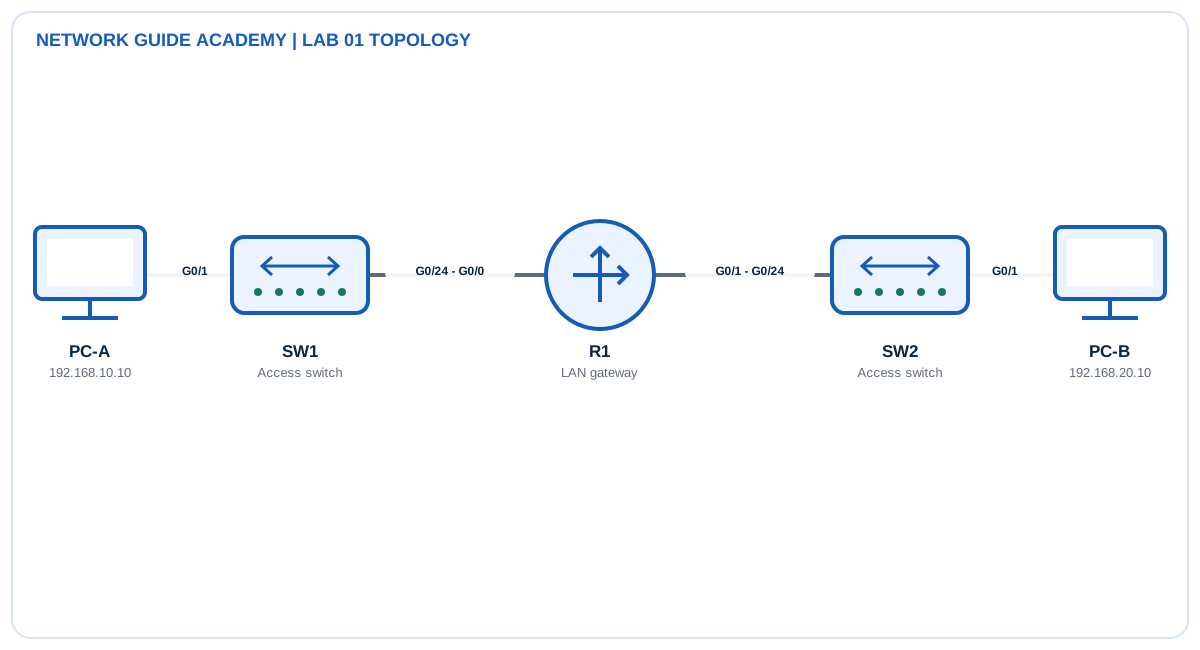
Addressing and design
- R1 G0/0: 192.168.10.1/24
- R1 G0/1: 192.168.20.1/24
- PC-A: 192.168.10.10/24, gateway 192.168.10.1
- PC-B: 192.168.20.10/24, gateway 192.168.20.1
Tasks
- Place one router, two 2960 switches, and two PCs; use straight-through copper links.
- Configure hostnames R1, SW1, and SW2 and disable DNS lookup.
- Configure the two router interface addresses and issue no shutdown.
- Configure both PCs and test the local default gateway before end-to-end reachability.
- Save the configurations and export screenshots of show ip interface brief and successful pings.
Detailed configuration workflow
- Cable and power the topology, then confirm link LEDs before configuring IP.
- Apply hostnames, disable DNS lookup, add interface descriptions, and configure both R1 LAN interfaces.
- Configure both PCs with the correct address, mask, and gateway; save only after the pings pass.
Example configuration and commands
enable
show clock
show version
show inventory
show ip interface brief
configure terminal
 hostname R1
 no ip domain-lookup
 service password-encryption
 banner motd #Authorized access only#
end
show running-config
copy running-config startup-config
Verification
- show ip interface brief
- show interfaces description
- show running-config | section interface
- ping 192.168.20.10
Expected healthy evidence
- show ip interface brief: R1 G0/0 and G0/1 display up/up with the assigned addresses.
- show running-config: hostname, banner, interface descriptions, and IP addresses are present.
- PC-A to PC-B ping: five replies succeed after ARP resolution; the first echo can time out while ARP completes.
Troubleshooting matrix
| Symptom | Inspect | Likely correction |
|---|---|---|
| PC cannot reach its gateway | show ip interface brief; inspect cable and PC mask | Correct cabling/addressing and issue no shutdown |
| Configuration disappears after reload | show startup-config | copy running-config startup-config |
| Command pauses on a mistyped name | Observe Translating message | Use no ip domain-lookup |
Success criteria: Both router interfaces are up/up, each PC reaches its gateway, and PC-A reaches PC-B.
Exam and operations tips
- Learn what the prompt tells you before memorizing commands.
- A configured interface remains administratively down until no shutdown is applied.
Quick knowledge check
Which command returns directly from a configuration submode to privileged EXEC?
end
Which configuration is used immediately by the router?
The running configuration in RAM.